
For Learners
Find answers to common questions about learning with CSC.
Last updated on 16 September 2026
Register for a Programme
How do I search for a programme?
Discover programmes that interest you on CSC LEARN platform (opens in new tab). You will be able to filter your search by Programme Type, Domain, Target Audience and Provider. For a more targeted search using competencies, please log in as a public officer. Click on the menu icon on the top left. Select “Explore Learning Products” and choose your domain. Then browse and select the competencies you're interested in to see matching learning products.
How to register for a programme?
You can register via CSC LEARN platform (opens in new tab). Navigate to your desired programme, and click "Apply Now” to select the available class dates, or choose "View More Dates” to see other options. Select your Training Coordinator from the list. Review your application details before clicking "Submit” to complete your registration. Your Training Coordinator has up to 3 working days to approve your registration request. You'll receive both a LEARN notification and an email once your application is approved.
Note: To attend milestone programmes, you have to be nominated by your agency. Contact your Training Coordinator to find out more.
How do I check my application status?
To check your application status, log in to the CSC LEARN platform (opens in new tab), click on the menu icon and select "My Applications”. This will show you the status of all your submitted applications. Once your registration is successful, you'll receive a Programme Placement Letter (PPL) via email 2 to 3 weeks before the programme starts. While we will always do our best to confirm your registration as early as possible, classes may sometimes be postponed or cancelled due to unforeseen circumstances.
Learning with disabilities
The Civil Service College is committed to creating a learning environment that meets the diverse needs of its participants. If you anticipate or experience any barriers to learning in the programme you are interested in, please feel free to discuss your concerns with your Training Coordinator and CSC’s Customer Experience Team. Learners with disabilities may also wish to work with your Training Coordinator and CSC’s Customer Experience Team to discuss options to improve the learning experience for you. Please also let us know what level of assistance you prefer.
Attending Your Programme
Where do I find the classroom details?
Log in to CSC LEARN platform (opens in new tab) to access the classroom details , including classroom details (for in-person programmes), zoom link (for virtual programmes), pre-learning materials and assignments (if any), and programme materials.
How do I mark my attendance?
You may mark your attendance by “checking in” to your programme on CSC's eAttendance page.
At the start of the class, scan the QR code provided by your trainer with your mobile device or manually input the URL in your web browser to launch the attendance page.
Check that the details of your class are correct, and click on “Check-in”.
To ensure your attendance is captured in a timely manner, please download the Singpass App on your mobile device with camera functionality and set up your Singpass account (if you have yet to do so) prior to your class. We also recommend that you arrive at least 15 minutes before the class start time to have sufficient time to complete this check-in process.
What if I missed my check-in?
Check-in will close 90 minutes after the class has started. Thereafter, an email notification regarding your check-in status will be sent to your Training Coordinator. If you arrive after the check-in time, please inform your trainer and provide reasons for being late.
Withdrawing Your Registration
Can I cancel my application while it's pending Training Coordinator's approval?
To cancel your pending application in the CSC LEARN platform (opens in new tab), click on the menu icon and select "My Applications”. Find and click on the application you want to cancel to view its details. Look for the text “You may cancel this application here” and click this link to cancel. Once completed, your application status will change to “Cancelled”.
Can I withdraw my registration after programme placement?
If you are scheduled for an upcoming CSC programme and you are unable to attend, here is what you need to do:
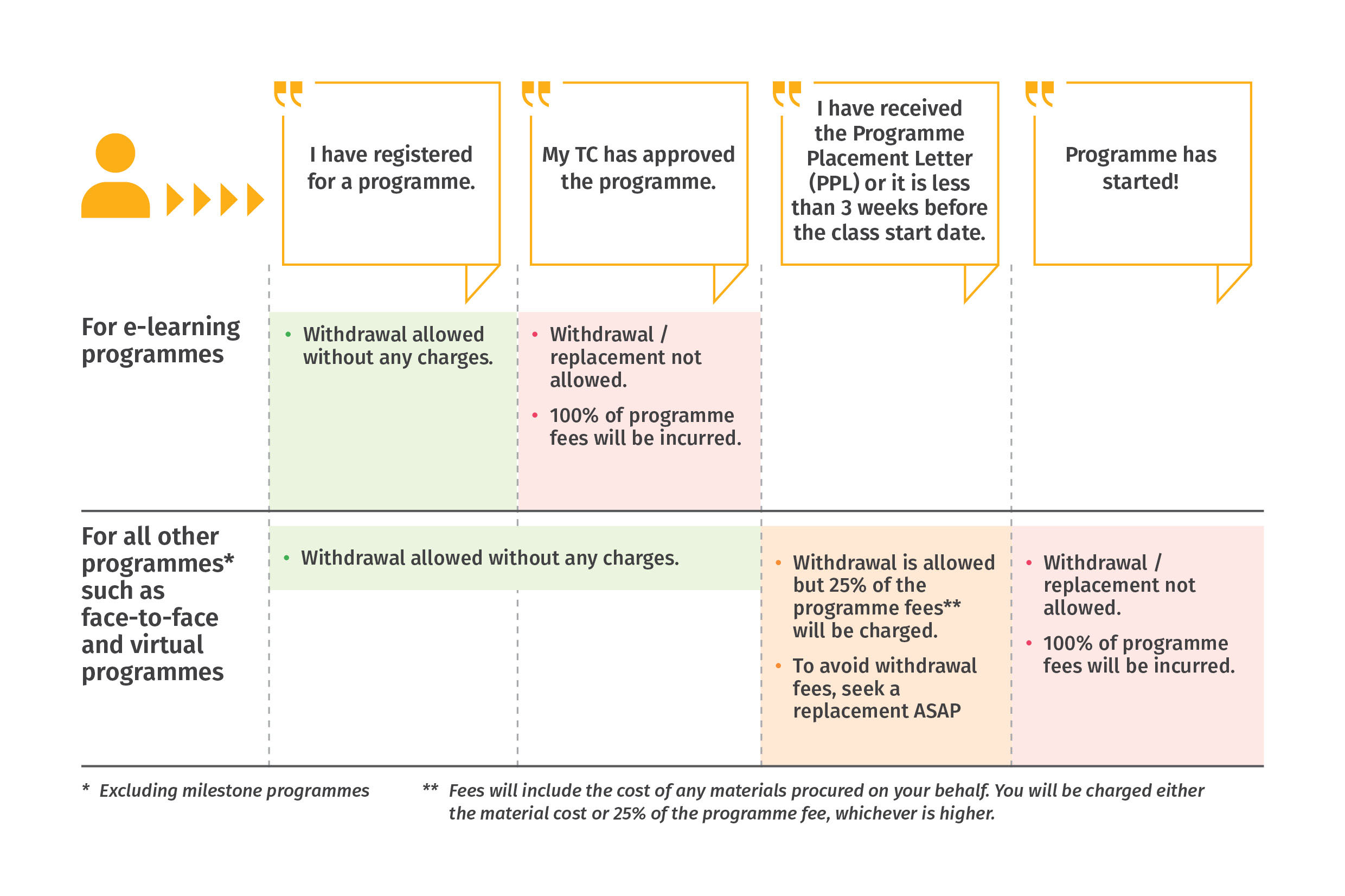
Notify your Training Coordinator (TC) early, preferably at least 3 weeks before the class start date, otherwise a withdrawal fee may be incurred. All withdrawal / replacement requests have to be submitted by your TC.
Concurrently, check among your colleagues if anyone is able to take your place for the programme. If yes, remember to seek your respective RO’s support, and provide the details (name, NRIC, email address) of your colleague to your TC.
If you have not found a replacement, please provide your TC the reason(s) you are unable to attend. Where fees are incurred due to late notice, CSC will assess the reasons provided and determine if the charges can be waived. Do note that reasons such as going on leave/vacation will not be accepted as these should have been planned ahead of time.
Do note the withdrawal timelines below to avoid any charges:
For more information, please refer to this FAQ (opens in new tab).
Can I move to a different class date?
Yes. If you need to change your class date, notify your Training Coordinator (TC) early, at least 3 weeks before the class start date, as a withdrawal fee may be incurred for late requests. Your TC will withdraw you from the current class and you may re-register for a preferred class, subject to availability.
More questions?
If you have any questions not addressed above, you can contact us at cscollege@cscollege.gov.sg.